
One paper, one photo
Snap a paper, and it’s in the calendar.
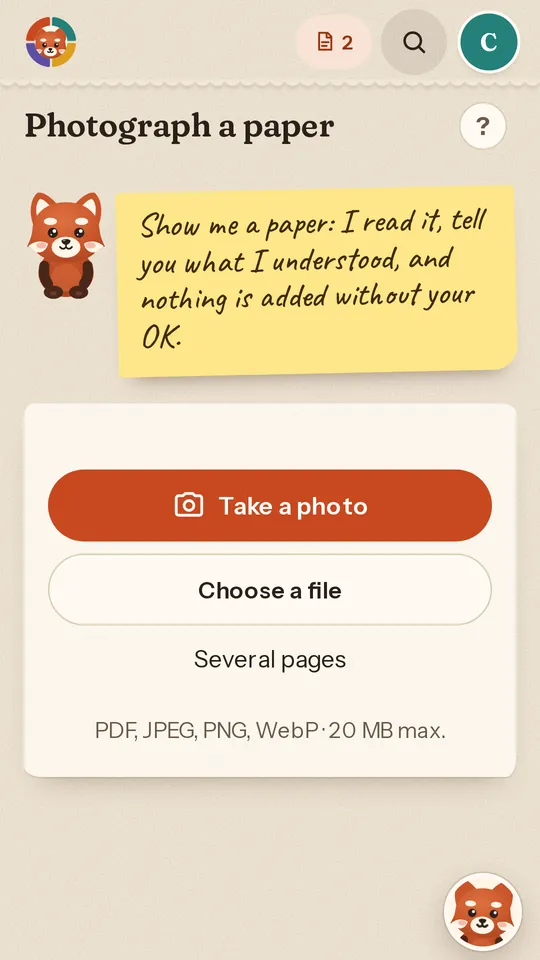
Birthday invitation, school note, canteen menu, circus poster: take a photo. Câlin reads the date, time and place, then shows you what it understood before adding anything.
Papers pile up on the fridge
An invitation slipped into the school bag, a note from the teacher, this week’s menu. Every paper hides a date you must not miss. It has to be copied somewhere, and it is often copied too late.
What Câlin does
Tap “Show Câlin”, take the photo or choose a file: PDF, JPEG, PNG or WebP, up to 20 MB. A paper with several pages is photographed page by page, up to ten.
Câlin reads the paper and prepares what it holds: an event, a task, things to bring, a journey. A canteen menu becomes each day’s dishes, in Meals and shopping.
When something is missing, it does not make it up. It asks a short question quoting the paper, and you can answer “I don’t know yet”.
How it works
- You photograph the paper, or import the file you received.
- Câlin shows you what it is preparing. You fix a detail if needed.
- You confirm: the event joins the whole family’s calendar.
- The paper stays in your documents, one tap from the event.
Frequently asked questions
Which papers can Câlin read?
Everyday papers with a date: invitations, school notes, canteen menus, posters. A photo, a PDF or a JPEG, PNG or WebP image, up to 20 MB.
Does Câlin add anything without asking me?
No. Nothing is added to the calendar before you confirm. The paper itself is kept in your documents, so the source stays at hand.
What if the date is unreadable or missing?
Câlin does not guess. It asks you a short question quoting the paper, and you can answer later.
How many papers per month?
10 document analyses per month on the free plan, 300 on the Family plan. The counter resets on the 1st of each month.